> ## Documentation Index
> Fetch the complete documentation index at: https://docs.kaleidoswap.com/llms.txt
> Use this file to discover all available pages before exploring further.
# Asset Swaps
> Step-by-step instructions for performing an asset swap in the KaleidoSwap Desktop App
Asset swaps let you exchange one asset for another through the KaleidoSwap platform. The desktop app uses **atomic swaps** — both sides of the trade execute simultaneously, so neither party can cheat.
## Prerequisites
Before you can swap, make sure you have:
1. **A funded wallet** — You need a balance of the asset you want to swap. See [Deposits](/desktop-app/wallet/deposits).
2. **An open channel** — The channel must have sufficient capacity for the swap amount, and it must include the RGB asset you want to trade. See [Opening Channels](/desktop-app/channels/opening-channel) or [Buy a Channel](/desktop-app/channels/order-new-channel).
## Performing an Asset Swap
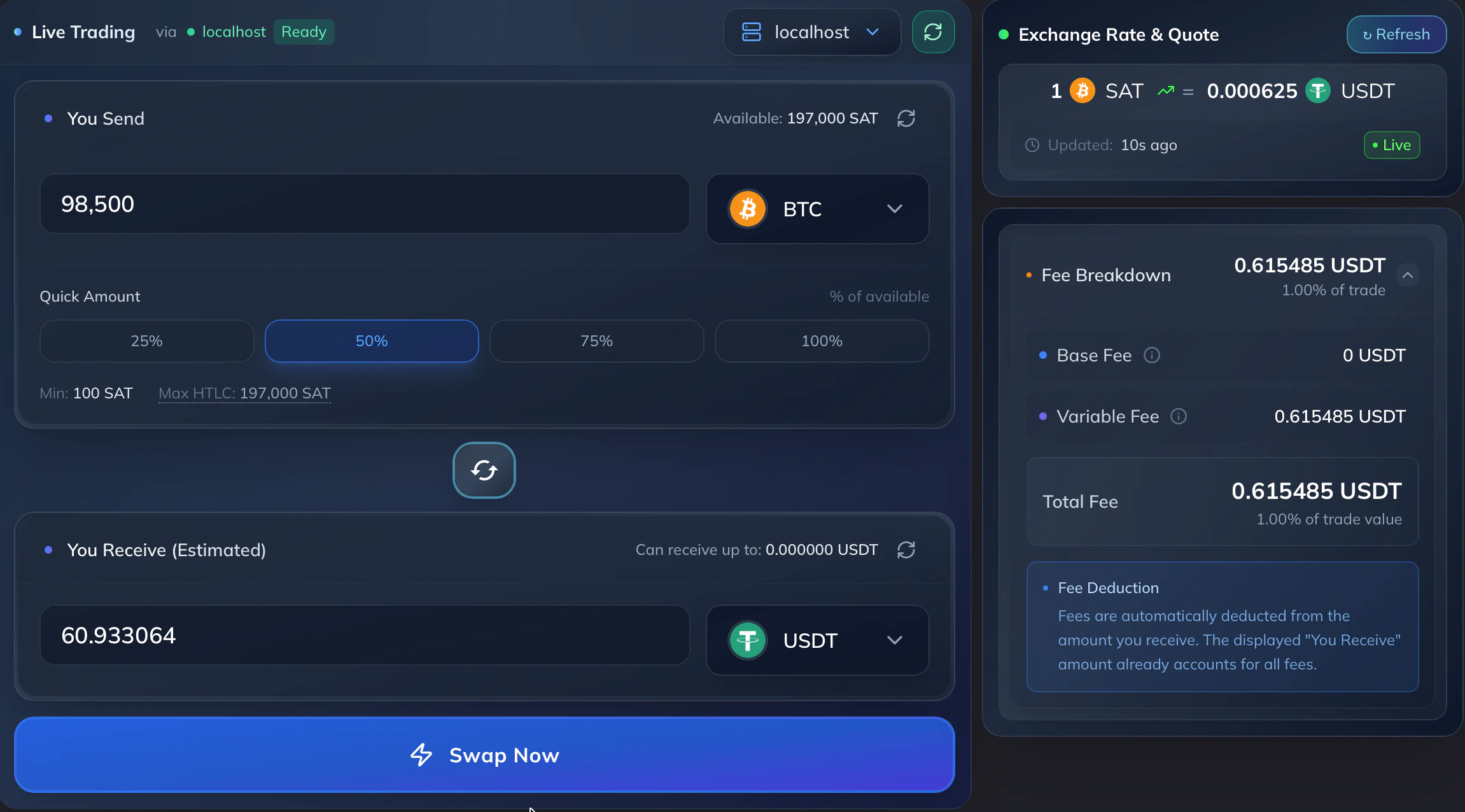
Click on the **"Trade"** tab in the left sidebar. Select the **"Market Maker"** option to start.
Choose the asset you have (e.g. BTC) and the asset you want to receive (e.g. USDT).
Specify the amount of the asset you wish to swap. The app will show you the estimated amount you'll receive based on the current exchange rate.
Check the exchange rate and any fees. Click **"Swap"** to execute the transaction.
The swap executes atomically over the Lightning Network. Once complete, you'll see a success confirmation.
 ## Supported Trading Pairs
| Pair | Description |
| -------------- | -------------------------------- |
| **BTC / USDT** | Bitcoin to Tether USD (RGB NIA) |
| **BTC / XAUT** | Bitcoin to Tether Gold (RGB NIA) |
Additional pairs may be available depending on your connected LSP and market maker.
## Swap History
View your past swaps in the **"History"** tab for record-keeping and reconciliation.
## Troubleshooting
Ensure you have enough balance in the correct channel. On-chain balance alone is not sufficient — the asset must be allocated to a Lightning channel with the trading peer.
Check that your node is connected to a peer that supports the asset pair. You may need to open a channel with an LSP that provides market-making services.
Atomic swaps on Lightning should settle in seconds. If a swap appears stuck, check your node's connection status in Settings. Restarting the app may help if the connection was interrupted.
## Supported Trading Pairs
| Pair | Description |
| -------------- | -------------------------------- |
| **BTC / USDT** | Bitcoin to Tether USD (RGB NIA) |
| **BTC / XAUT** | Bitcoin to Tether Gold (RGB NIA) |
Additional pairs may be available depending on your connected LSP and market maker.
## Swap History
View your past swaps in the **"History"** tab for record-keeping and reconciliation.
## Troubleshooting
Ensure you have enough balance in the correct channel. On-chain balance alone is not sufficient — the asset must be allocated to a Lightning channel with the trading peer.
Check that your node is connected to a peer that supports the asset pair. You may need to open a channel with an LSP that provides market-making services.
Atomic swaps on Lightning should settle in seconds. If a swap appears stuck, check your node's connection status in Settings. Restarting the app may help if the connection was interrupted.