

Overview
The KaleidoSwap Extension injects standard wallet providers into browser pages so DApps can interact with wallet capabilities after user approval. It follows the same provider conventions as other browser wallets (e.g., Alby), so most existing WebLN, WebBTC, and Nostr apps work without any KaleidoSwap-specific integration. The extension injects:window.webln— WebLN provider for Lightning (invoices, payments, message signing, keysend, LNURL).window.webbtc— WebBTC provider for on-chain Bitcoin (addresses, PSBT signing, BIP-322 message signing, broadcasting).window.nostr— full NIP-07 provider for Nostr event signing and encryption.window.bitcoin— a Bitcoin Wallet Standard provider (Unisat/OKX/Leather-style) that some DApps probe for on-chain accounts.window.rgb— a KaleidoSwap-specific provider for RGB assets: issue, receive, send and track assets, and, with a Lightning node, pay and receive them over Lightning.
How It Works
- The KaleidoSwap Extension’s content script is injected into web pages
- The content script loads an injected script that adds
window.webln,window.webbtc,window.nostr,window.bitcoin, andwindow.rgb - DApps call methods on those providers
- Requests are routed to the KaleidoSwap Extension background service worker
- Sensitive operations trigger a confirmation or permission prompt
Provider Ready Events
The injected script dispatches ready events (both with and without the colon, for SDK parity) once the providers are installed:webln:ready/weblnReadywebbtc:ready/webbtcReadynostr:readybitcoin:readyrgb:ready
Error Codes
Every provider rejects with anError that carries a code property, so a DApp can tell a user’s “no” from a wallet fault:
WebLN Provider
window.webln follows the WebLN spec and can be used to:
- Request node information
- Create Lightning invoices
- Send Lightning payments
- Sign and verify messages
- Send keysend payments
- Handle LNURL requests
- Read balance details
Supported Methods
Example Usage
WebBTC Provider
window.webbtc is an on-chain Bitcoin provider that can:
- Return a receive address
- Sign and finalize PSBTs
- Sign messages (BIP-322)
- Broadcast raw transactions
- Send on-chain payments
Supported Methods
Some DApps probe
window.bitcoin (a Bitcoin Wallet Standard provider) instead of, or alongside, window.webbtc. It exposes connect(), getAccounts(), getPublicKey(), signMessage(), signPsbt(), pushPsbt(), and sendBitcoin() over the same wallet keys.PSBT Confirmations
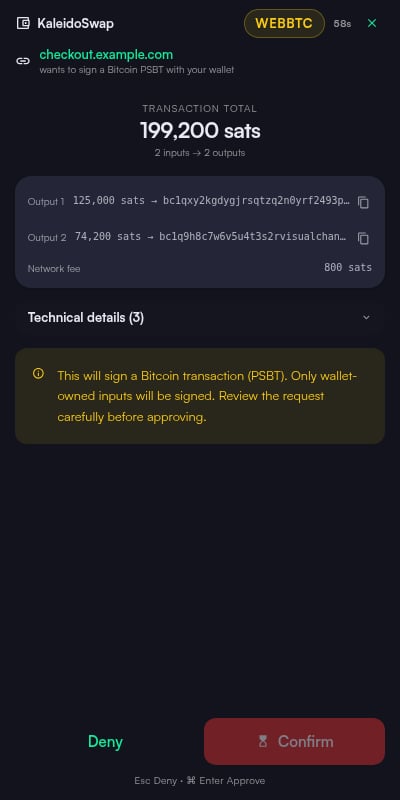
ApprovingsignPsbt, finalizePsbt, or pushPsbt is never blind-signing: the confirmation prompt decodes the PSBT and shows the destinations, amounts, and network fee before you approve. If the amounts cannot be decoded from the PSBT, the prompt shows an explicit warning instead.
RGB Provider
window.rgb exposes the wallet’s RGB runtime to DApps — the node-less RGB wallet or a connected RGB Lightning node, whichever the wallet is configured with — so an app can issue, receive, send and track RGB assets without running its own RGB backend. Every funds-touching call confirms in the extension popup, and the connect prompt lets the user restrict an origin to specific capabilities (minting is gated by its own issueAsset capability).
window.rgb ships from extension 0.3.0 on. It is not present in 0.2.0 builds; feature-detect it with the rgb:ready event rather than assuming it exists.TypeScript Support
The@kaleidorg/webrgb package ships the window.rgb declarations and a requestProvider() helper that waits for the rgb:ready event when the page runs before the wallet:
Supported Methods
Example Usage
RGB over Lightning
When the wallet’s RGB runtime is a Lightning node,getInfo().protocol is "RGB_LN" and methods also lists makeLnInvoice and payLnInvoice. On a node-less RGB wallet both reject with METHOD_NOT_SUPPORTED.
payLnInvoice prompts.
Events
{ assetId, transferId, status, kind, amount, recipientId, txid }. Events are pushed by a background poll that runs about once a minute while a subscribed origin has an open tab, so there is no need to poll listTransfers() in a loop — but do not expect sub-minute latency.
Nostr Provider (NIP-07)
The KaleidoSwap Extension injects a full NIP-07 provider atwindow.nostr, so Nostr web apps can request the wallet’s public key, sign events, and encrypt or decrypt direct messages. The Nostr identity is derived from the wallet recovery phrase (or an imported identity, when set).
Supported Methods
Example Usage
Nostr Connect (NIP-46)
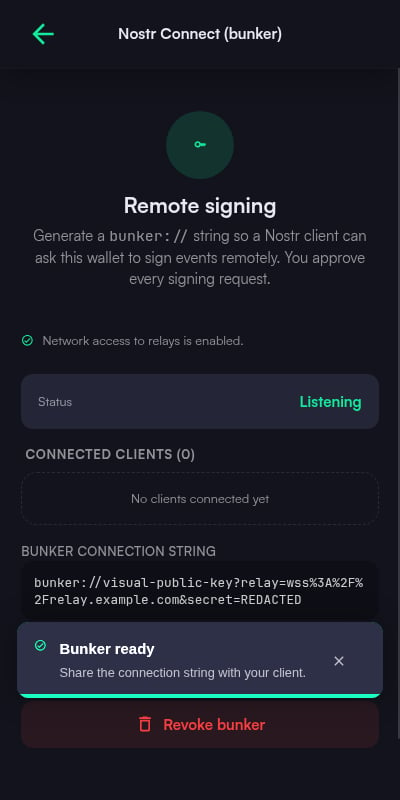
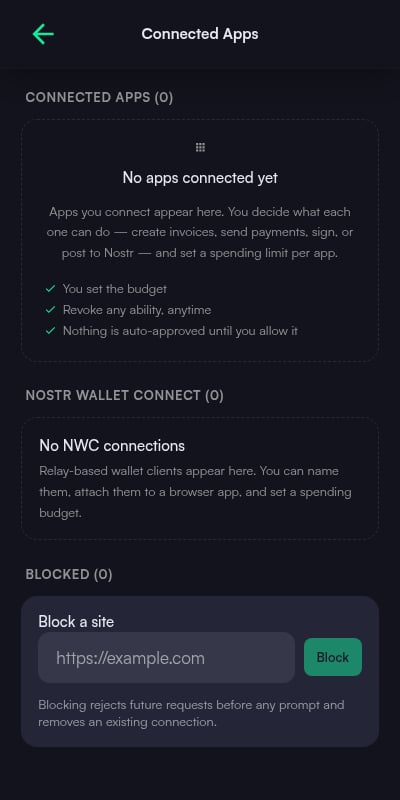
Beyond in-page NIP-07 signing, the extension can act as a remote signer for Nostr apps that support NIP-46 (nsecBunker). From Settings > Nostr Connect, generate abunker:// connection string and paste it into the client app; signing requests then travel over Nostr relays and are approved in the extension. Active NIP-46 sessions appear in Connected Apps, where they can be reviewed and revoked.
Nostr Wallet Connect (NWC)
The extension can also expose the wallet to external apps over Nostr Wallet Connect: pair an app by scanning the pairing QR code, then control what it can do with amount-aware budgets. Zap payments (NIP-57) made through NWC are validated and correlated with wallet activity.For Developers
NWC is the integration path for anything that is not a web page in the same browser — mobile apps, desktop clients, bots and backends. The extension acts as the NIP-47 wallet service; any NIP-47 client library works against it, so nothing KaleidoSwap-specific is required. The pairing string generated in Settings > Nostr Wallet Connect has the standard shape:1.0 with nip04 and nip44_v2 encryption and supports these methods:
Each paired client gets its own spending budget, visible and revocable under Settings > Connected Apps. A payment within budget settles without a prompt; anything over it opens the same confirmation window the in-page providers use.
Permission Prompts and Connected Apps
When a connected site makes a sensitive request, the KaleidoSwap Extension asks the user to approve or deny the action. Connected Nostr clients start from a “Reasonable” consent default (comparable to other NIP-07 wallets): routine, low-risk operations are allowed for a connected app, while payments and other sensitive actions still prompt.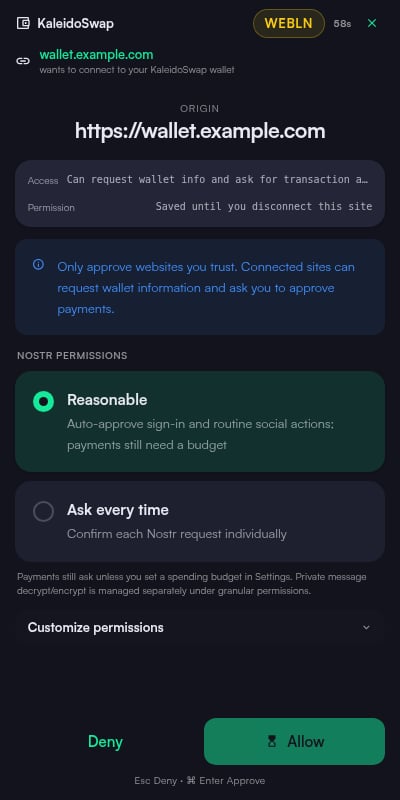
Nostr Identity
The KaleidoSwap Extension derives a Nostr identity from the wallet recovery phrase (or an imported identity) and exposes it both to web pages throughwindow.nostr and in the extension settings.
Nostr Key Management
Your Nostr keypair is managed in Settings > Nostr Account:- View your public key (
npub) - View/copy the session private key when the wallet is unlocked
- Re-derive identity from the wallet recovery phrase
nsec1… or 64-character hex) during onboarding or later from Settings; it is stored encrypted and used everywhere the derived identity would be.
Browser Approval Flow
The KaleidoSwap Extension keeps DApp approvals user-driven:- A trusted site requests a connection, payment, invoice, asset, or signing action
- The KaleidoSwap Extension routes the request through the content script and background service worker
- The user reviews the details and approves or rejects the action
Security Considerations
Access the Beta
Request access to the KaleidoSwap Extension closed beta.