

Overview
The KaleidoSwap Extension includes an in-extension swap surface. It can use KaleidoSwap maker pairs when the optional RGB Lightning Node account is connected, and it can use Spark/Flashnet routes when Spark pools are available.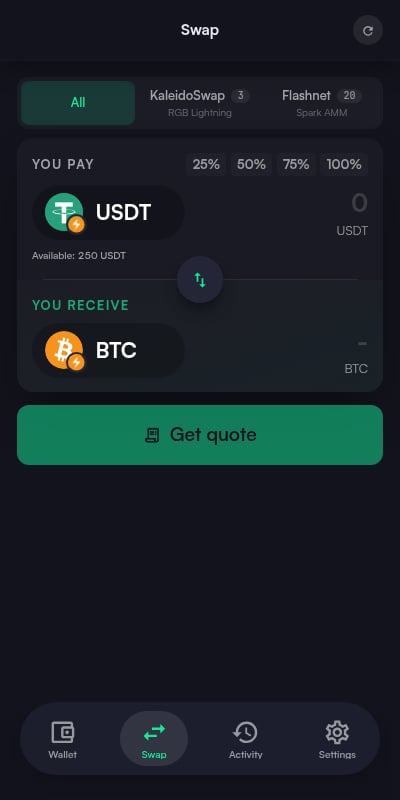
Swaps exchange one asset for another inside your wallet. To move funds between Spark and external chains (EVM networks, Solana, and more), use the Bridge instead.
Prerequisites
Before swapping:- At least one compatible swap venue must be available
- The relevant account must be connected
- You must have sufficient balance for the source asset and network fees
Swap Flow
1
Open Swap
Click the Swap button on the dashboard action grid.
2
Select Assets
Choose the From and To assets:
- From - The asset you want to trade (e.g., BTC)
- To - The asset you want to receive
3
Enter Amount
Enter the amount you want to swap. The extension fetches a quote from the selected venue showing:
- Exchange rate
- Output amount
- Fees
- Expiry
4
Review
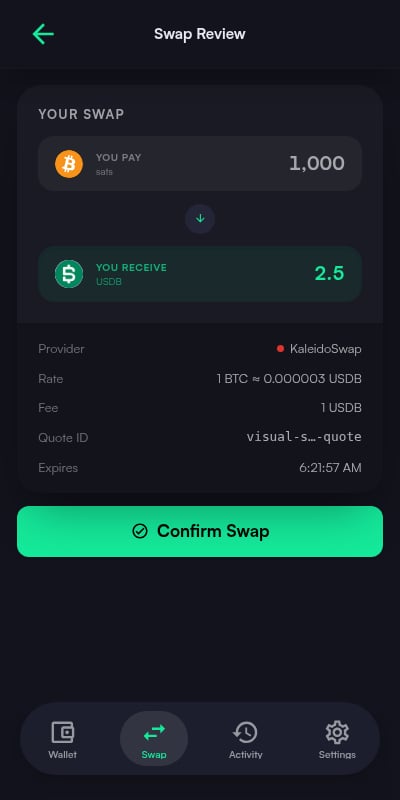
The swap preview screen shows:
- From asset and amount
- To asset and amount
- Exchange rate
- Fee breakdown
- Total cost
5
Confirm
Confirm the swap before the quote expires.
6
Track Status
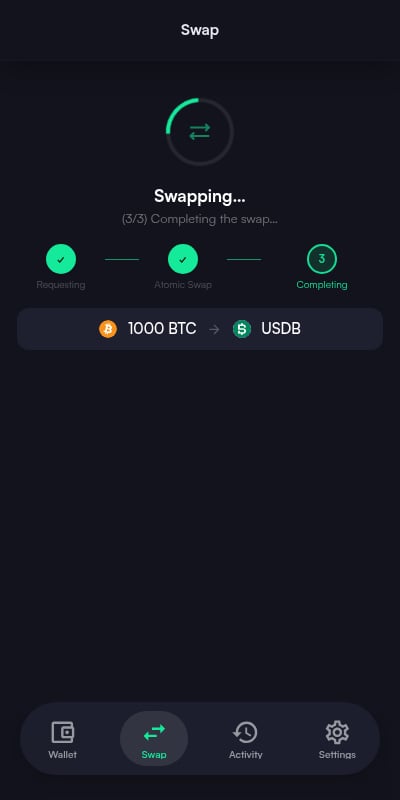
The swap status screen shows a three-step progress tracker:
- Requesting
- Atomic Swap
- Completing
Real-Time Quotes
When you enter an amount, the KaleidoSwap Extension fetches a quote from the active venue:
Quotes update in real time as you change the amount.
Slippage Protection
Flashnet swaps enforce a built-in maximum slippage of 5%: the minimum output amount is derived from that limit, and the swap fails rather than executing at a worse rate. Slippage is not user-configurable.Swap Status
After confirming, the status screen tracks the swap through three steps:
When the swap finishes, the screen shows a success result. If a step fails, an error message with the failure details is shown instead.
If no compatible venue or pair is available, the KaleidoSwap Extension shows an empty state instead of a quote. Wallet features such as deposits, withdrawals, balances, and settings still work.
Tips
Check your balance first
Check your balance first
Make sure you have enough of the source asset to cover both the swap amount and any fees.
Confirm quickly
Confirm quickly
Quotes expire after a short period. Review and confirm promptly to avoid needing a new quote.
Read the failure message
Read the failure message
If a swap fails, the status screen shows an error message with the failure details.
Access the Beta
Request access to the KaleidoSwap Extension closed beta.