

What a Channel Backup Contains
A backup is a complete encrypted archive of your node’s data directory. It captures the full node state — Lightning channel data, RGB asset data, and on-chain wallet state — so a restored node picks up exactly where the backup left off. Backups do not replace your mnemonic phrase. Keep both:- Mnemonic phrase — the root of your wallet keys, written down offline
- Backup file — the node state needed to restore your channels and assets
Creating a Channel Backup
1
Open Settings
Click the button in the upper right corner of the app to open the drop-down menu, then select Settings.
2
Click Backup Wallet
In the Settings panel, click on Backup Wallet.
3
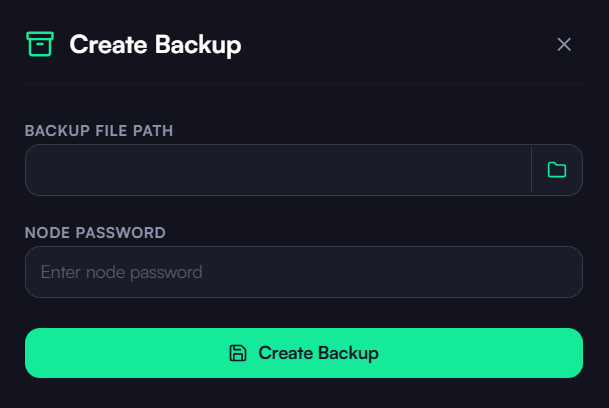
Choose a Destination
Select a secure location to save the backup file. Choose somewhere you can access later — ideally an external drive or encrypted cloud storage.
4
Enter Your Node Password
Input your node password. The backup file is encrypted with this password.
5
Create the Backup
Click Create Backup. The encrypted backup file is saved to your chosen destination.
When to Create a New Backup
Create a fresh backup after any of the following events:- Opening a new channel
- Closing a channel
- After restoring from a previous backup
- On a regular schedule (e.g., weekly)
Restoring from a Backup
If you need to restore your wallet on a new device:- Reinstall the KaleidoSwap Desktop App
- Choose Restore Wallet during the setup flow
- Select your backup file and enter the node password you set when creating it
- Allow the node to start and sync
Download the Desktop App
Get the latest KaleidoSwap Desktop App release for macOS, Windows, or Linux.