Turn on the local AI brain in the KaleidoSwap Desktop App — app modes, on-device models, privacy, and how it reaches your wallet through MCP
KaleidoMind is an experimental preview. Behavior changes between releases.
The brain is the reasoning engine behind Chat. It runs on your device: the model, the tool calls, and the reasoning all stay local, so no wallet or node data leaves the machine.
Choose Node + Mind or Only Mind on the welcome screen or in Settings → Capabilities, or click Activate Mind in the sidebar:
Mode
What runs
Node + Mind
The wallet and node together with the local brain — the full experience
Only Node
Just the RGB Lightning Node, channels, and swaps. No AI
Only Mind
Just the local brain, no node required
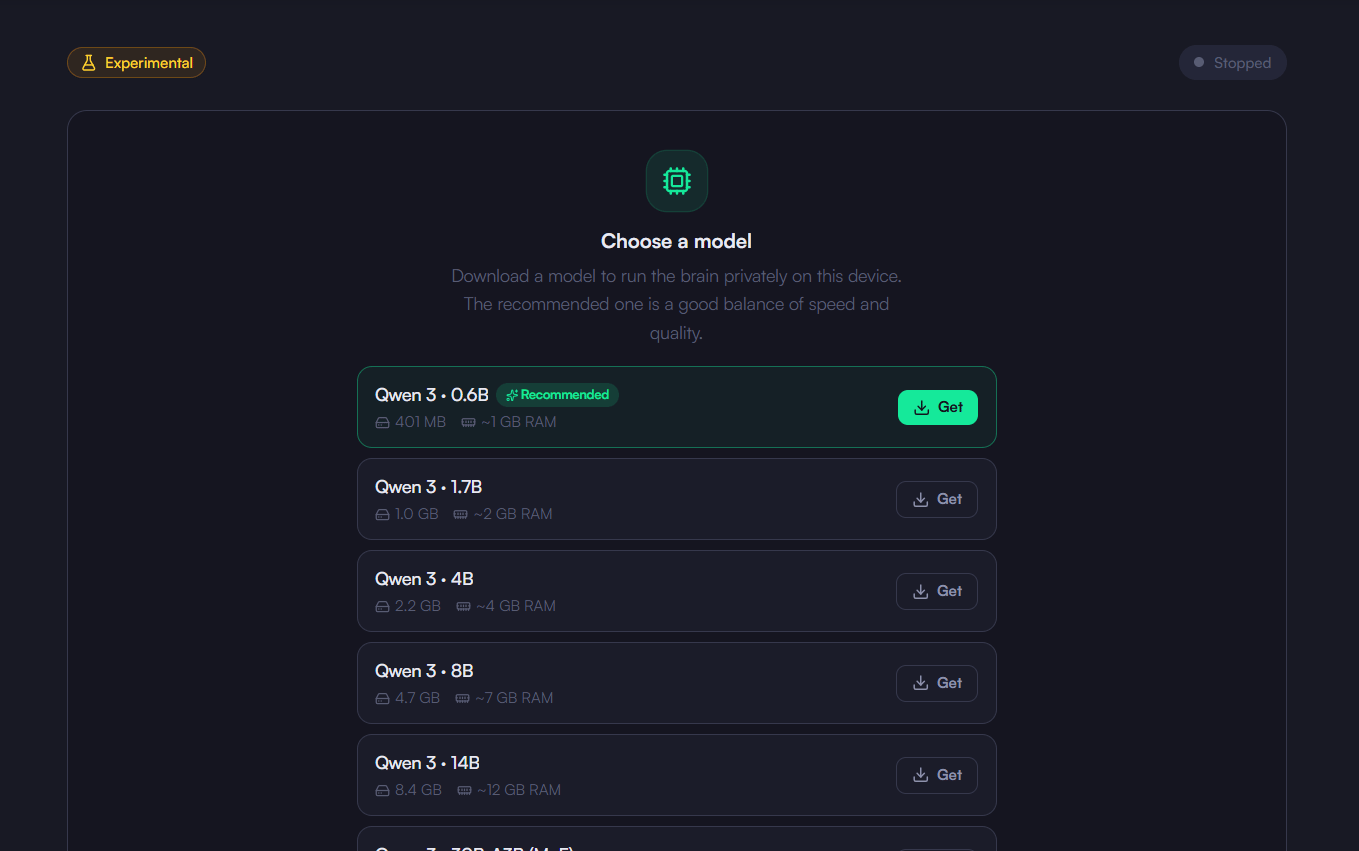
Open KaleidoMind → Chat, click Download KaleidoMind to install the runtime, then under Choose a model click Get on a model (Qwen 3 0.6B is Recommended) and start the brain. The runtime ships for macOS, Windows (x64), and Linux.
The brain does not touch your keys. It reads balances, channels, and quotes — and drafts payments and swaps — through the KaleidoSwap MCP server, the same typed tool surface any other MCP client would use.Because every fund-moving tool is marked as requiring confirmation in that contract, the engine has to stop and ask. Read operations run freely; spends do not.
Agent (autonomous scheduled tasks) is shown as Soon in v0.5.1 and is not yet available from the sidebar.
Was this page helpful?
{"docsConfig":{"theme":"mint","$schema":"https://mintlify.com/docs.json","name":"KaleidoSwap Documentation","colors":{"primary":"#0D9373","light":"#07C983","dark":"#0D9373"},"logo":{"light":"https://mintcdn.com/kaleidoswap/jZkXeFEXDE4-8PkF/assets/logos/kaleidoswap-full-logo-horizontal-onlight.svg?fit=max\u0026auto=format\u0026n=jZkXeFEXDE4-8PkF\u0026q=85\u0026s=8cf2002b5e2b8ea1cfb0523af2525f09","dark":"https://mintcdn.com/kaleidoswap/jZkXeFEXDE4-8PkF/assets/logos/kaleidoswap-full-logo-horizontal.svg?fit=max\u0026auto=format\u0026n=jZkXeFEXDE4-8PkF\u0026q=85\u0026s=1d5d02f344b0a00783670693d8d928ec"},"favicon":"https://mintcdn.com/kaleidoswap/jZkXeFEXDE4-8PkF/assets/logos/kaleidoswap-favicon.ico?fit=max\u0026auto=format\u0026n=jZkXeFEXDE4-8PkF\u0026q=85\u0026s=7a218e79e2eff3be0d975a63e39bf5af","api":{"playground":{"display":"interactive"},"mdx":{"auth":{"method":"bearer"},"server":"https://maker.signet.kaleidoswap.com"}},"navbar":{"links":[{"href":"/sdk/installation","label":"Build"}],"primary":{"type":"button","label":"Download the Apps","href":"https://kaleidoswap.com/products"}},"footer":{"socials":{"x":"https://x.com/kaleidoswap","github":"https://github.com/kaleidoswap","telegram":"https://t.me/kaleidoswap"}},"integrations":{"posthog":{"apiKey":"phc_g3NF1o9hsu8tFROxZaRT9JfD1BdBEQYfIIcrkVzTkps","apiHost":"https://eu.i.posthog.com","sessionRecording":true}},"styling":{"latex":false},"navigation":{"languages":[{"language":"en","default":true,"href":"whats-kaleidoswap/introduction"},{"language":"cn","navbar":{"links":[{"href":"/cn/sdk/installation","label":"构建"}],"primary":{"type":"button","label":"下载应用","href":"https://kaleidoswap.com/products"}},"href":"cn/whats-kaleidoswap/introduction"}]}},"deployment":{"deploymentMetadataValue":{"subdomain":"kaleidoswap","hasAudioNarration":false,"actualSubdomain":"kaleidoswap","customDomains":["docs.kaleidoswap.com"],"gitSource":{"type":"github","owner":"kaleidoswap","repo":"docs","deployBranch":"main","contentDirectory":"mintlify-docs","isPrivate":true,"mountPath":"","label":""},"chroma":{"liveDeploymentHistoryId":"6ae2233ab344d78ea3e3a604","collectionId":"83c2a469-aa98-4500-ad7c-33ee34f8ca43","schemaVersion":"v3","latestBuiltDeploymentHistoryId":"6ae2233ab344d78ea3e3a604"},"feedback":{"thumbs":true},"entitlements":{},"buildId":"6ae2233ab344d78ea3e3a604","clientVersion":"0.0.4054","searchFilterCounts":[{"language":"default","tag":"API Reference","count":42},{"language":"en","tag":"Reference","count":28},{"language":"en","tag":"CLI","count":28},{"language":"cn","tag":"参考","count":25},{"language":"en","tag":"Desktop App","count":24},{"language":"en","tag":"SDK","count":24},{"language":"cn","tag":"简介","count":24},{"language":"cn","tag":"桌面应用","count":24},{"language":"en","tag":"Introduction","count":22},{"language":"cn","tag":"SDK","count":17},{"language":"en","tag":"AI Tools","count":11},{"language":"en","tag":"Node SDK","count":11},{"language":"cn","tag":"AI 工具","count":11},{"language":"cn","tag":"CLI","count":11},{"language":"en","tag":"Extensions","count":10},{"language":"cn","tag":"浏览器扩展","count":10},{"language":"en","tag":"Guides","count":9},{"language":"cn","tag":"API 参考","count":9},{"language":"en","tag":"Wallet Operations","count":8},{"language":"cn","tag":"钱包操作","count":8},{"language":"cn","tag":"概览","count":8},{"language":"default","tag":"Chain swaps","count":7},{"language":"default","tag":"Atomic RGB swaps","count":5},{"language":"default","tag":"Reverse swaps","count":5},{"language":"default","tag":"Chain data","count":4},{"language":"default","tag":"Recovery","count":4},{"language":"default","tag":"Service","count":4},{"language":"default","tag":"Submarine swaps","count":4},{"language":"default","tag":"Lightning channels (LSPS1)","count":3},{"language":"default","tag":"Swap status","count":3}]},"assistantConfig":{"enableAskAiButton":false,"enableStarterQuestions":false,"enableAskAiSearchBar":true},"basePath":"","hasChatPermissions":false,"hasWebMcpPermissions":false,"toggles":[{"name":"kill-isr","enabled":true,"variant":{"name":"disabled","enabled":false,"feature_enabled":true},"impressionData":false},{"name":"agent-mintlify-slack","enabled":true,"variant":{"name":"disabled","enabled":false,"feature_enabled":true},"impressionData":false},{"name":"agent-integrations-settings","enabled":true,"variant":{"name":"disabled","enabled":false,"feature_enabled":true},"impressionData":false},{"name":"automations-pr-grouping","enabled":true,"variant":{"name":"disabled","enabled":false,"feature_enabled":true},"impressionData":false},{"name":"custom-prefix","enabled":true,"variant":{"name":"disabled","enabled":false,"feature_enabled":true},"impressionData":false},{"name":"analytics-v7","enabled":true,"variant":{"name":"disabled","enabled":false,"feature_enabled":true},"impressionData":false},{"name":"user-flows-analytics","enabled":true,"variant":{"name":"disabled","enabled":false,"feature_enabled":true},"impressionData":false},{"name":"no-publish-flow","enabled":true,"variant":{"name":"disabled","enabled":false,"feature_enabled":true},"impressionData":false},{"name":"workos-onboarding","enabled":true,"variant":{"name":"disabled","enabled":false,"feature_enabled":true},"impressionData":false},{"name":"llms-txt-v2","enabled":true,"variant":{"name":"disabled","enabled":false,"feature_enabled":true},"impressionData":false},{"name":"snapshot-serving-live","enabled":true,"variant":{"name":"disabled","enabled":false,"feature_enabled":true},"impressionData":false},{"name":"stripTemperatureMiddleware","enabled":true,"variant":{"name":"disabled","enabled":false,"feature_enabled":true},"impressionData":false},{"name":"support-platform-pylon-zendesk","enabled":true,"variant":{"name":"disabled","enabled":false,"feature_enabled":true},"impressionData":false},{"name":"snapshot-serving","enabled":true,"variant":{"name":"disabled","enabled":false,"feature_enabled":true},"impressionData":false},{"name":"instant-rollback","enabled":true,"variant":{"name":"disabled","enabled":false,"feature_enabled":true},"impressionData":false},{"name":"granular-notifications-server","enabled":true,"variant":{"name":"disabled","enabled":false,"feature_enabled":true},"impressionData":false},{"name":"granular-notifications","enabled":true,"variant":{"name":"disabled","enabled":false,"feature_enabled":true},"impressionData":false},{"name":"automations-fable","enabled":true,"variant":{"name":"disabled","enabled":false,"feature_enabled":true},"impressionData":false},{"name":"fixed-ai-action-pricing","enabled":true,"variant":{"name":"disabled","enabled":false,"feature_enabled":true},"impressionData":false},{"name":"automation-resolve-merge-conflict","enabled":true,"variant":{"name":"disabled","enabled":false,"feature_enabled":true},"impressionData":false},{"name":"scoped-publishing","enabled":true,"variant":{"name":"disabled","enabled":false,"feature_enabled":true},"impressionData":false},{"name":"mintql","enabled":true,"variant":{"name":"disabled","enabled":false,"feature_enabled":true},"impressionData":false},{"name":"page-level-analytics","enabled":true,"variant":{"name":"disabled","enabled":false,"feature_enabled":true},"impressionData":false},{"name":"editor-version-history-v2","enabled":true,"variant":{"name":"disabled","enabled":false,"feature_enabled":true},"impressionData":false},{"name":"billing-page-v2","enabled":true,"variant":{"name":"disabled","enabled":false,"feature_enabled":true},"impressionData":false},{"name":"full-page-search","enabled":true,"variant":{"name":"disabled","enabled":false,"feature_enabled":true},"impressionData":false},{"name":"workspace-projects","enabled":true,"variant":{"name":"disabled","enabled":false,"feature_enabled":true},"impressionData":false},{"name":"assistant-v5","enabled":true,"variant":{"name":"disabled","enabled":false,"feature_enabled":true},"impressionData":false},{"name":"byok-sep-25","enabled":true,"variant":{"name":"disabled","enabled":false,"feature_enabled":true},"impressionData":false},{"name":"fork-pr-previews","enabled":true,"variant":{"name":"disabled","enabled":false,"feature_enabled":true},"impressionData":false},{"name":"revalidation-jwt","enabled":true,"variant":{"name":"disabled","enabled":false,"feature_enabled":true},"impressionData":false},{"name":"vite-origin","enabled":true,"variant":{"name":"disabled","enabled":false,"feature_enabled":true},"impressionData":false},{"name":"billing-updated-9-15","enabled":true,"variant":{"name":"disabled","enabled":false,"feature_enabled":true},"impressionData":false},{"name":"workos-sso-scim","enabled":true,"variant":{"name":"disabled","enabled":false,"feature_enabled":true},"impressionData":false},{"name":"hobby-abuse-scan","enabled":true,"variant":{"name":"disabled","enabled":false,"feature_enabled":true},"impressionData":false},{"name":"dashboard-inbox","enabled":true,"variant":{"name":"disabled","enabled":false,"feature_enabled":true},"impressionData":false},{"name":"workos-signup","enabled":true,"variant":{"name":"disabled","enabled":false,"feature_enabled":true},"impressionData":false},{"name":"turbopuffer-dual-write","enabled":true,"variant":{"name":"disabled","enabled":false,"feature_enabled":true},"impressionData":false},{"name":"workos-enabled","enabled":true,"variant":{"name":"disabled","enabled":false,"feature_enabled":true},"impressionData":false},{"name":"approve-review-flow","enabled":true,"variant":{"name":"disabled","enabled":false,"feature_enabled":true},"impressionData":false},{"name":"sso-setup-deadline-banner","enabled":true,"variant":{"name":"disabled","enabled":false,"feature_enabled":true},"impressionData":false},{"name":"rbac-expansion","enabled":true,"variant":{"name":"disabled","enabled":false,"feature_enabled":true},"impressionData":false}],"googleFontsInlined":false},"customCss":[{"filePath":"style.css","content":"main img,main img.rounded{display:block;margin-left:auto;margin-right:auto;border-radius:.5rem;box-shadow:0 4px 8px -1px rgb(0 0 0/.12),0 12px 28px -4px rgb(0 0 0/.18)}.dark main img,.dark main img.rounded{border-radius:.5rem;box-shadow:0 4px 8px -1px rgb(0 0 0/.45),0 14px 34px -4px rgb(0 0 0/.65)}main :is(p, figure) :is(a, div, span):has(img[src*=\"/desktop-app/\"]),main :is(p, figure):has(img[src*=\"/desktop-app/\"]){padding:0!important;background:0 0!important;border:0!important;box-shadow:none!important}main img[src*=\"/desktop-app/\"],main img[src*=\"/extension/\"]{display:block;height:auto;border-radius:.5rem;box-shadow:0 4px 8px -1px rgb(0 0 0/.12),0 12px 28px -4px rgb(0 0 0/.18)}main img[src*=\"/desktop-app/\"]{margin:1.5rem auto;padding:0!important;background:0 0!important;border:0!important;width:min(100%,800px);max-width:800px}.dark main img[src*=\"/desktop-app/\"],.dark main img[src*=\"/extension/\"]{box-shadow:0 4px 8px -1px rgb(0 0 0/.45),0 14px 34px -4px rgb(0 0 0/.65)}main img[src*=\"/extension/\"]{margin-left:auto;margin-right:auto;max-width:360px}"}],"page":{"pagePath":"desktop-app/kaleidomind/brain","slug":"/desktop-app/kaleidomind/brain","pageMetadata":{"title":"Enable the KaleidoMind Brain","sidebarTitle":"Brain","description":"Turn on the local AI brain in the KaleidoSwap Desktop App — app modes, on-device models, privacy, and how it reaches your wallet through MCP","href":"/desktop-app/kaleidomind/brain"},"description":{"compiledSource":"\"use strict\";\nconst {jsx: _jsx} = arguments[0];\nconst {useMDXComponents: _provideComponents} = arguments[0];\nfunction _createMdxContent(props) {\n const _components = {\n p: \"p\",\n ..._provideComponents(),\n ...props.components\n };\n return _jsx(_components.p, {\n children: \"Turn on the local AI brain in the KaleidoSwap Desktop App — app modes, on-device models, privacy, and how it reaches your wallet through MCP\"\n });\n}\nfunction MDXContent(props = {}) {\n const {wrapper: MDXLayout} = {\n ..._provideComponents(),\n ...props.components\n };\n return MDXLayout ? _jsx(MDXLayout, {\n ...props,\n children: _jsx(_createMdxContent, {\n ...props\n })\n }) : _createMdxContent(props);\n}\nreturn {\n default: MDXContent\n};\n","frontmatter":{},"scope":{}},"pageType":"default","mdx":{"mdxSource":{"compiledSource":"\"use strict\";const{Fragment:_Fragment,jsx:_jsx,jsxs:_jsxs}=arguments[0];const{useMDXComponents:_provideComponents}=arguments[0];function _createMdxContent(props){const _components={a:`a`,em:`em`,p:`p`,strong:`strong`,tbody:`tbody`,td:`td`,th:`th`,thead:`thead`,tr:`tr`,..._provideComponents(),...props.components},{Heading,OptimizedImage,Table,Warning}=_components;if(!Heading)_missingMdxReference(`Heading`,true);if(!OptimizedImage)_missingMdxReference(`OptimizedImage`,true);if(!Table)_missingMdxReference(`Table`,true);if(!Warning)_missingMdxReference(`Warning`,true);return _jsxs(_Fragment,{children:[_jsx(Warning,{children:_jsx(_components.p,{children:`KaleidoMind is an experimental preview. Behavior changes between releases.`})}),`\n`,_jsxs(_components.p,{children:[`The brain is the reasoning engine behind `,_jsx(_components.a,{href:`/desktop-app/kaleidomind/chat`,children:`Chat`}),`. It runs `,_jsx(_components.strong,{children:`on your device`}),`: the model, the tool calls, and the reasoning all stay local, so no wallet or node data leaves the machine.`]}),`\n`,_jsx(Heading,{level:`2`,id:`turning-it-on`,children:`Turning It On`}),`\n`,_jsxs(_components.p,{children:[`Choose `,_jsx(_components.strong,{children:`Node + Mind`}),` or `,_jsx(_components.strong,{children:`Only Mind`}),` on the welcome screen or in `,_jsx(_components.strong,{children:`Settings → Capabilities`}),`, or click `,_jsx(_components.strong,{children:`Activate Mind`}),` in the sidebar:`]}),`\n`,_jsxs(Table,{children:[_jsx(_components.thead,{children:_jsxs(_components.tr,{children:[_jsx(_components.th,{children:`Mode`}),_jsx(_components.th,{children:`What runs`})]})}),_jsxs(_components.tbody,{children:[_jsxs(_components.tr,{children:[_jsx(_components.td,{children:_jsx(_components.strong,{children:`Node + Mind`})}),_jsx(_components.td,{children:`The wallet and node together with the local brain — the full experience`})]}),_jsxs(_components.tr,{children:[_jsx(_components.td,{children:_jsx(_components.strong,{children:`Only Node`})}),_jsx(_components.td,{children:`Just the RGB Lightning Node, channels, and swaps. No AI`})]}),_jsxs(_components.tr,{children:[_jsx(_components.td,{children:_jsx(_components.strong,{children:`Only Mind`})}),_jsx(_components.td,{children:`Just the local brain, no node required`})]})]})]}),`\n`,_jsxs(_components.p,{children:[`Open `,_jsx(_components.strong,{children:`KaleidoMind → Chat`}),`, click `,_jsx(_components.strong,{children:`Download KaleidoMind`}),` to install the runtime, then under `,_jsx(_components.strong,{children:`Choose a model`}),` click `,_jsx(_components.strong,{children:`Get`}),` on a model (Qwen 3 0.6B is Recommended) and start the brain. The runtime ships for macOS, Windows (x64), and Linux.`]}),`\n`,_jsx(OptimizedImage,{src:`https://mintcdn.com/kaleidoswap/jZkXeFEXDE4-8PkF/assets/images/desktop-app/28_model-download.png?fit=max\u0026auto=format\u0026n=jZkXeFEXDE4-8PkF\u0026q=85\u0026s=d061642202ea7f80a20e6442bc825455`,alt:`KaleidoMind AI Model download screen`,\"data-og-width\":`1359`,width:`1359`,\"data-og-height\":`851`,height:`851`,\"data-path\":`assets/images/desktop-app/28_model-download.png`,\"data-optimize\":`true`,\"data-opv\":`3`,srcset:`https://mintcdn.com/kaleidoswap/jZkXeFEXDE4-8PkF/assets/images/desktop-app/28_model-download.png?w=280\u0026fit=max\u0026auto=format\u0026n=jZkXeFEXDE4-8PkF\u0026q=85\u0026s=e4ba9d1c89b51bc2a75bc7bfdc0d8271 280w, https://mintcdn.com/kaleidoswap/jZkXeFEXDE4-8PkF/assets/images/desktop-app/28_model-download.png?w=560\u0026fit=max\u0026auto=format\u0026n=jZkXeFEXDE4-8PkF\u0026q=85\u0026s=36e1d57729ecbe37fe7da8507694a1f0 560w, https://mintcdn.com/kaleidoswap/jZkXeFEXDE4-8PkF/assets/images/desktop-app/28_model-download.png?w=840\u0026fit=max\u0026auto=format\u0026n=jZkXeFEXDE4-8PkF\u0026q=85\u0026s=4446187dcb149a0ea6ab5254e67f3b66 840w, https://mintcdn.com/kaleidoswap/jZkXeFEXDE4-8PkF/assets/images/desktop-app/28_model-download.png?w=1100\u0026fit=max\u0026auto=format\u0026n=jZkXeFEXDE4-8PkF\u0026q=85\u0026s=0e188ee8eb1ed082399a9e943f387fad 1100w, https://mintcdn.com/kaleidoswap/jZkXeFEXDE4-8PkF/assets/images/desktop-app/28_model-download.png?w=1650\u0026fit=max\u0026auto=format\u0026n=jZkXeFEXDE4-8PkF\u0026q=85\u0026s=93cd13475dd1004bf4ec701afe95f40a 1650w, https://mintcdn.com/kaleidoswap/jZkXeFEXDE4-8PkF/assets/images/desktop-app/28_model-download.png?w=2500\u0026fit=max\u0026auto=format\u0026n=jZkXeFEXDE4-8PkF\u0026q=85\u0026s=a0e204f44451618bc8d48acef2a02567 2500w`}),`\n`,_jsx(Heading,{level:`2`,id:`how-it-reaches-your-wallet`,children:`How It Reaches Your Wallet`}),`\n`,_jsxs(_components.p,{children:[`The brain does not touch your keys. It reads balances, channels, and quotes — and drafts payments and swaps — through the KaleidoSwap `,_jsx(_components.a,{href:`/ai-tools/mcp-servers`,children:`MCP server`}),`, the same typed tool surface any other MCP client would use.`]}),`\n`,_jsx(_components.p,{children:`Because every fund-moving tool is marked as requiring confirmation in that contract, the engine has to stop and ask. Read operations run freely; spends do not.`}),`\n`,_jsx(Heading,{level:`2`,id:`autonomy`,children:`Autonomy`}),`\n`,_jsxs(_components.p,{children:[_jsx(_components.strong,{children:`Agent`}),` (autonomous scheduled tasks) is shown as `,_jsx(_components.em,{children:`Soon`}),` in v0.5.1 and is not yet available from the sidebar.`]})]})}function MDXContent(props={}){const{wrapper:MDXLayout}={..._provideComponents(),...props.components};return MDXLayout?_jsx(MDXLayout,{...props,children:_jsx(_createMdxContent,{...props})}):_createMdxContent(props)}return{default:MDXContent};function _missingMdxReference(id,component){throw new Error(`Expected `+(component?`component`:`object`)+\" `\"+id+\"` to be defined: you likely forgot to import, pass, or provide it.\")}","frontmatter":{},"scope":{"config":{},"pageMetadata":{"title":"Enable the KaleidoMind Brain","sidebarTitle":"Brain","description":"Turn on the local AI brain in the KaleidoSwap Desktop App — app modes, on-device models, privacy, and how it reaches your wallet through MCP","href":"/desktop-app/kaleidomind/brain"}}},"mdxSourceWithNoJs":null},"mdxExtracts":{"tableOfContents":[{"title":"Turning It On","slug":"turning-it-on","depth":2,"children":[]},{"title":"How It Reaches Your Wallet","slug":"how-it-reaches-your-wallet","depth":2,"children":[]},{"title":"Autonomy","slug":"autonomy","depth":2,"children":[]}],"codeExamples":{}},"jsLinks":[],"subdomain":"kaleidoswap","siteName":"KaleidoSwap Documentation","title":"Enable the KaleidoMind Brain - KaleidoSwap Documentation","navMaps":{"firstHrefInVersion":{},"firstHrefInLanguage":{"en":{"href":"/desktop-app/kaleidomind/brain","matchLevel":0},"cn":{"href":"/cn/desktop-app/kaleidomind/brain","matchLevel":1}}},"lastModified":"2026-10-20T15:24:29.258Z","originalFileLocation":"desktop-app/kaleidomind/brain.mdx","locale":"en"},"headHtml":"\u003cscript data-mint-head>(function(){var d=document.documentElement,p=null;if(!p){try{p=localStorage.getItem(\"isDarkMode\")}catch(e){}if(p==='true')p='dark';else if(p==='false')p='light';if(p!=='light'\u0026\u0026p!=='dark'\u0026\u0026p!=='system')p=\"system\"}var r=p==='system'?(matchMedia(\"(prefers-color-scheme: dark)\").matches?'dark':'light'):p;d.classList.remove(r==='dark'?'light':'dark');d.classList.add(r);d.setAttribute(\"data-theme-preference\",p)})();\u003c/script>\u003cmeta data-mint-head name=\"description\" content=\"Turn on the local AI brain in the KaleidoSwap Desktop App — app modes, on-device models, privacy, and how it reaches your wallet through MCP\">\u003cmeta data-mint-head name=\"application-name\" content=\"KaleidoSwap Documentation\">\u003cmeta data-mint-head name=\"generator\" content=\"Mintlify\">\u003clink data-mint-head rel=\"icon\" type=\"image/png\" sizes=\"192x192\" href=\"/mintlify-assets/_mintlify/favicons/kaleidoswap/Pdo8Pj4dmhUA96o_/_generated/favicon/android-chrome-192x192.png\" media=\"(prefers-color-scheme: light)\">\u003clink data-mint-head rel=\"apple-touch-icon\" type=\"image/png\" sizes=\"180x180\" href=\"/mintlify-assets/_mintlify/favicons/kaleidoswap/Pdo8Pj4dmhUA96o_/_generated/favicon/apple-touch-icon.png\">\u003clink data-mint-head rel=\"icon\" type=\"image/png\" sizes=\"16x16\" href=\"/mintlify-assets/_mintlify/favicons/kaleidoswap/Pdo8Pj4dmhUA96o_/_generated/favicon/favicon-16x16.png\" media=\"(prefers-color-scheme: light)\">\u003clink data-mint-head rel=\"icon\" type=\"image/png\" sizes=\"32x32\" href=\"/mintlify-assets/_mintlify/favicons/kaleidoswap/Pdo8Pj4dmhUA96o_/_generated/favicon/favicon-32x32.png\" media=\"(prefers-color-scheme: light)\">\u003clink data-mint-head rel=\"shortcut icon\" type=\"image/x-icon\" href=\"/mintlify-assets/_mintlify/favicons/kaleidoswap/Pdo8Pj4dmhUA96o_/_generated/favicon/favicon.ico\" media=\"(prefers-color-scheme: light)\">\u003clink data-mint-head rel=\"icon\" type=\"image/png\" sizes=\"192x192\" href=\"/mintlify-assets/_mintlify/favicons/kaleidoswap/Pdo8Pj4dmhUA96o_/_generated/favicon-dark/android-chrome-192x192.png\" media=\"(prefers-color-scheme: dark)\">\u003clink data-mint-head rel=\"icon\" type=\"image/png\" sizes=\"16x16\" href=\"/mintlify-assets/_mintlify/favicons/kaleidoswap/Pdo8Pj4dmhUA96o_/_generated/favicon-dark/favicon-16x16.png\" media=\"(prefers-color-scheme: dark)\">\u003clink data-mint-head rel=\"icon\" type=\"image/png\" sizes=\"32x32\" href=\"/mintlify-assets/_mintlify/favicons/kaleidoswap/Pdo8Pj4dmhUA96o_/_generated/favicon-dark/favicon-32x32.png\" media=\"(prefers-color-scheme: dark)\">\u003clink data-mint-head rel=\"shortcut icon\" type=\"image/x-icon\" href=\"/mintlify-assets/_mintlify/favicons/kaleidoswap/Pdo8Pj4dmhUA96o_/_generated/favicon-dark/favicon.ico\" media=\"(prefers-color-scheme: dark)\">\u003cmeta data-mint-head property=\"og:title\" content=\"Enable the KaleidoMind Brain - KaleidoSwap Documentation\">\u003cmeta data-mint-head property=\"og:description\" content=\"Turn on the local AI brain in the KaleidoSwap Desktop App — app modes, on-device models, privacy, and how it reaches your wallet through MCP\">\u003cmeta data-mint-head property=\"og:site_name\" content=\"KaleidoSwap Documentation\">\u003cmeta data-mint-head property=\"og:url\" content=\"https://docs.kaleidoswap.com/desktop-app/kaleidomind/brain\">\u003cmeta data-mint-head property=\"og:type\" content=\"website\">\u003cmeta data-mint-head property=\"og:image\" content=\"https://kaleidoswap.mintlify.app/_mintlify/api/og/v2?division=KaleidoMind\u0026amp;title=Enable+the+KaleidoMind+Brain\u0026amp;description=Turn+on+the+local+AI+brain+in+the+KaleidoSwap+Desktop+App+%E2%80%94+app+modes%2C+on-device+models%2C+privacy%2C+and+how+it+reaches+your+wallet+through+MCP\u0026amp;theme=cfe07bcada45289f816a9e3e\u0026amp;signature=8f95097e22ef38a32ea9fec09b65542224b7f036ffa4f9a1daba9ec675d1cbaa\">\u003cmeta data-mint-head property=\"og:image:width\" content=\"1200\">\u003cmeta data-mint-head property=\"og:image:height\" content=\"630\">\u003cmeta data-mint-head name=\"twitter:card\" content=\"summary_large_image\">\u003cmeta data-mint-head name=\"twitter:title\" content=\"Enable the KaleidoMind Brain - KaleidoSwap Documentation\">\u003cmeta data-mint-head name=\"twitter:description\" content=\"Turn on the local AI brain in the KaleidoSwap Desktop App — app modes, on-device models, privacy, and how it reaches your wallet through MCP\">\u003cmeta data-mint-head name=\"twitter:image\" content=\"https://kaleidoswap.mintlify.app/_mintlify/api/og/v2?division=KaleidoMind\u0026amp;title=Enable+the+KaleidoMind+Brain\u0026amp;description=Turn+on+the+local+AI+brain+in+the+KaleidoSwap+Desktop+App+%E2%80%94+app+modes%2C+on-device+models%2C+privacy%2C+and+how+it+reaches+your+wallet+through+MCP\u0026amp;theme=cfe07bcada45289f816a9e3e\u0026amp;signature=8f95097e22ef38a32ea9fec09b65542224b7f036ffa4f9a1daba9ec675d1cbaa\">\u003cmeta data-mint-head name=\"twitter:image:width\" content=\"1200\">\u003cmeta data-mint-head name=\"twitter:image:height\" content=\"630\">\u003cmeta data-mint-head name=\"msapplication-config\" content=\"/mintlify-assets/_mintlify/favicons/kaleidoswap/Pdo8Pj4dmhUA96o_/_generated/favicon/browserconfig.xml\">\u003cmeta data-mint-head name=\"apple-mobile-web-app-title\" content=\"KaleidoSwap Documentation\">\u003cmeta data-mint-head name=\"msapplication-TileColor\" content=\"#0D9373\">\u003clink data-mint-head rel=\"canonical\" href=\"https://docs.kaleidoswap.com/desktop-app/kaleidomind/brain\">\u003clink data-mint-head rel=\"alternate\" type=\"application/xml\" href=\"/sitemap.xml\">\u003clink data-mint-head rel=\"alternate\" type=\"text/markdown\" href=\"/desktop-app/kaleidomind/brain.md\">\u003clink data-mint-head rel=\"alternate\" hreflang=\"en\" href=\"https://docs.kaleidoswap.com/desktop-app/kaleidomind/brain\">\u003clink data-mint-head rel=\"alternate\" hreflang=\"zh\" href=\"https://docs.kaleidoswap.com/cn/desktop-app/kaleidomind/brain\">\u003clink data-mint-head rel=\"alternate\" hreflang=\"x-default\" href=\"https://docs.kaleidoswap.com/desktop-app/kaleidomind/brain\">\u003cscript data-mint-head type=\"application/ld+json\">{\"@context\":\"https://schema.org\",\"@graph\":[{\"@type\":\"Organization\",\"@id\":\"https://docs.kaleidoswap.com/#organization\",\"name\":\"KaleidoSwap Documentation\",\"url\":\"https://docs.kaleidoswap.com\",\"logo\":{\"@type\":\"ImageObject\",\"url\":\"https://mintcdn.com/kaleidoswap/jZkXeFEXDE4-8PkF/assets/logos/kaleidoswap-full-logo-horizontal-onlight.svg?fit=max\u0026auto=format\u0026n=jZkXeFEXDE4-8PkF\u0026q=85\u0026s=8cf2002b5e2b8ea1cfb0523af2525f09\"}},{\"@type\":\"WebSite\",\"@id\":\"https://docs.kaleidoswap.com#website\",\"name\":\"KaleidoSwap Documentation\",\"url\":\"https://docs.kaleidoswap.com\",\"publisher\":{\"@id\":\"https://docs.kaleidoswap.com/#organization\"}},{\"@type\":\"WebPage\",\"@id\":\"https://docs.kaleidoswap.com/desktop-app/kaleidomind/brain#webpage\",\"url\":\"https://docs.kaleidoswap.com/desktop-app/kaleidomind/brain\",\"name\":\"Enable the KaleidoMind Brain\",\"description\":\"Turn on the local AI brain in the KaleidoSwap Desktop App — app modes, on-device models, privacy, and how it reaches your wallet through MCP\",\"dateModified\":\"2026-10-20T15:24:29.258Z\",\"isPartOf\":{\"@id\":\"https://docs.kaleidoswap.com#website\"},\"breadcrumb\":{\"@id\":\"https://docs.kaleidoswap.com/desktop-app/kaleidomind/brain#breadcrumb\"}},{\"@type\":\"BreadcrumbList\",\"@id\":\"https://docs.kaleidoswap.com/desktop-app/kaleidomind/brain#breadcrumb\",\"itemListElement\":[{\"@type\":\"ListItem\",\"position\":1,\"name\":\"KaleidoMind\",\"item\":\"https://docs.kaleidoswap.com/desktop-app/kaleidomind/chat\"},{\"@type\":\"ListItem\",\"position\":2,\"name\":\"Enable the KaleidoMind Brain\",\"item\":\"https://docs.kaleidoswap.com/desktop-app/kaleidomind/brain\"}]},{\"@type\":[\"Article\",\"TechArticle\"],\"@id\":\"https://docs.kaleidoswap.com/desktop-app/kaleidomind/brain#article\",\"headline\":\"Enable the KaleidoMind Brain\",\"name\":\"Enable the KaleidoMind Brain\",\"description\":\"Turn on the local AI brain in the KaleidoSwap Desktop App — app modes, on-device models, privacy, and how it reaches your wallet through MCP\",\"url\":\"https://docs.kaleidoswap.com/desktop-app/kaleidomind/brain\",\"mainEntityOfPage\":{\"@id\":\"https://docs.kaleidoswap.com/desktop-app/kaleidomind/brain#webpage\"},\"dateModified\":\"2026-10-20T15:24:29.258Z\",\"publisher\":{\"@id\":\"https://docs.kaleidoswap.com/#organization\"},\"isPartOf\":{\"@id\":\"https://docs.kaleidoswap.com#website\"}}]}\u003c/script>\u003cscript data-mint-head type=\"application/ld+json\">{\"@context\":\"https://schema.org\",\"@type\":\"WebSite\",\"name\":\"KaleidoSwap Documentation\",\"creator\":{\"@type\":\"Organization\",\"name\":\"Mintlify\",\"url\":\"https://mintlify.com\"}}\u003c/script>","siteName":"KaleidoSwap Documentation","nav":{"global":null,"languages":[{"language":"en","default":true,"tabs":[{"tab":"Overview","pages":[{"title":"Overview","href":"/whats-kaleidoswap/introduction"}]},{"tab":"Desktop App","groups":[{"group":"Introduction","icon":"flag","pages":[{"title":"KaleidoSwap Desktop App","sidebarTitle":"Overview","href":"/desktop-app/getting-started/introduction"},{"title":"KaleidoSwap Desktop App: Installation","sidebarTitle":"Installation","href":"/desktop-app/getting-started/installation"},{"title":"Verify Binary Downloads","href":"/desktop-app/getting-started/verify-binaries"},{"title":"KaleidoSwap Desktop App: Getting Started","sidebarTitle":"Getting Started","href":"/desktop-app/getting-started/setup"}]},{"group":"Wallet Operations","icon":"wallet","pages":[{"title":"Creating a New Wallet","href":"/desktop-app/wallet/creating-wallet"},{"title":"Unlocking Your Wallet","href":"/desktop-app/wallet/unlocking-wallet"},{"title":"Initializing with Mnemonic Backup","href":"/desktop-app/wallet/initializing-mnemonic"},{"title":"Deposit To Your Wallet","href":"/desktop-app/wallet/deposits"},{"title":"Withdraw from your wallet","href":"/desktop-app/wallet/withdrawals"},{"title":"Swap Assets","href":"/desktop-app/trading/asset-swaps"},{"title":"DCA Orders","href":"/desktop-app/trading/dca"},{"title":"Limit Orders","href":"/desktop-app/trading/limit-orders"}]},{"group":"Channel Management","icon":"code-branch","pages":[{"title":"Opening Channels","href":"/desktop-app/channels/opening-channel"},{"title":"Order New Channel","href":"/desktop-app/channels/order-new-channel"},{"title":"Channel Requests","href":"/desktop-app/channels/channel-requests"},{"title":"Channel Backups","href":"/desktop-app/channels/channel-backups"}]},{"group":"KaleidoMind","icon":"brain","pages":[{"title":"Chat with Your Wallet","sidebarTitle":"Chat","description":"Use KaleidoMind chat in the KaleidoSwap Desktop App to check balances, trade, and buy channels in plain language, with every spend behind a confirmation","href":"/desktop-app/kaleidomind/chat"},{"title":"Enable the KaleidoMind Brain","sidebarTitle":"Brain","href":"/desktop-app/kaleidomind/brain"}]},{"group":"Configuration","icon":"sliders","pages":[{"title":"Desktop App Settings","sidebarTitle":"Settings","description":"Configure the KaleidoSwap Desktop App, from network selection to node connection and interface preferences","href":"/desktop-app/support/settings"},{"title":"Self-Host a Multi-Asset Lightning Node","sidebarTitle":"Node Hosting","href":"/desktop-app/getting-started/node-hosting"}]},{"group":"Reference","icon":"book","pages":[{"title":"KaleidoSwap Desktop App Changelog","sidebarTitle":"Changelog","href":"/desktop-app/support/changelog"},{"title":"KaleidoSwap Desktop App FAQ","sidebarTitle":"FAQ","href":"/desktop-app/support/faq"},{"title":"KaleidoSwap Desktop App Troubleshooting","sidebarTitle":"Troubleshooting","href":"/desktop-app/support/troubleshooting"},{"title":"Additional Resources","href":"/desktop-app/support/additional-resources"}]}]},{"tab":"Extensions","pages":[{"title":"Extensions","href":"/extensions/introduction"}]},{"tab":"SDK","pages":[{"title":"SDK","href":"/sdk/introduction"}]},{"tab":"CLI","pages":[{"title":"CLI","href":"/cli/introduction"}]},{"tab":"AI Tools","pages":[{"title":"AI Tools","href":"/ai-tools/introduction"}]},{"tab":"API Reference","pages":[{"title":"API Reference","href":"/api-reference/introduction"}]},{"tab":"Wallet Engine","pages":[{"title":"Wallet Engine","href":"/wallet-engine/introduction"}]}],"global":{"anchors":[{"anchor":"Access Extension Beta","icon":"puzzle-piece","href":"https://kaleidoswap.com/products/extension/beta"},{"anchor":"Download Desktop App","icon":"download","href":"https://github.com/kaleidoswap/desktop-app/releases"},{"anchor":"Build with the SDK","icon":"code","href":"/sdk/installation"},{"anchor":"Website","icon":"globe","href":"https://kaleidoswap.com"},{"anchor":"GitHub","icon":"github","href":"https://github.com/kaleidoswap"}]}},{"language":"cn","navbar":{"links":[{"href":"/cn/sdk/installation","label":"构建"}],"primary":{"type":"button","label":"下载应用","href":"https://kaleidoswap.com/products"}},"pages":[{"title":"cn","href":"/cn/desktop-app/kaleidomind/brain"}]}]},"basePath":"","title":"Enable the KaleidoMind Brain - KaleidoSwap Documentation","buildId":"dpl_345ReqzYaAjzS9QpeJemsKdb7KDj","deploymentId":"dpl_345ReqzYaAjzS9QpeJemsKdb7KDj","dynamics":["a74be98ba7"],"chunks":["zoom-image-lightbox-B4-wUcHm.js","lightbox-handle-r17bVUz3.js"]}